Showing posts with label Computer tricks. Show all posts

Saturday, September 10, 2011

Interesting features on youtube & blogger

New feature on Youtube


I really get boared from Youtube when it loads the video so during that period i do my another work but what if i do not have my work then......


Youtube provide new feature of playing snake on youtube..


Just Click on Up direction Key button & game will starts play & enjoy even video loaded & start your game is not over it will run in front & video will play in back

New Blogger feature:-

Blogger release new GUI for blog editing in that new feature is to 'Set mobile view for Blog' 

1) just go to your blog dashboard 

2)Click on your blog link which appear

3)Then click on link template link appear in menu bar

4)then two picture link appear
  • live on blog
  • mobile


5)Click on gear appear below mobile view

6)Select template & then your blog appear like that on mobile


So Try this & Enjoy.............

Friday, August 26, 2011

Group application launcher in taskbar

There is always bunch of of icons on my taskbar. I just tiered of that. The simultaneous use of different browsers; word, powerpoint and excel; media player and few other applications.

And, now if there is a requirement to open a new application, it will be very lengthy procedure(Because i am very lazy). Though Windows 7 has solved the problem a bit by combining various files of one application and the taskbar icons are also comparatively small. But to have a better option you can use Dock for that but more better option is Bins.

Bins is a Windows 7 taskbar organizer available free of cost in the beta version. It is designed to group the different icons present on the taskbar. You can club similar or dissimilar items. But combining the similar items will be easy for the user to handle. The snapshot below displays the group of Google Chrome and Mozilla Firefox.

To ungroup it you have to just drag from bin-group to taskbar we can access both pages of browsers chrome & firefox from taskbar

Just click here to download it

Limitations:-
This s/w doesn't run at startup so we have to run it mannually & click two times to disable & re-enable it like shown below


The feasible way to run it at startup but bin settings can run on startup by putting shortcut up "binsetting.exe" from
C:\Users\Parth\AppData\Roaming\Microsoft\Windows\Start Menu\Programs\Bins
to
C:\Users\Parth\AppData\Roaming\Microsoft\Windows\Start Menu\Programs\Startup

so at startup Bins runs so u can chanfe setting
So Group application & Enjoy....

Saturday, August 20, 2011

Remove Most Recent Searched Keyword List In Windows Search

If you get rid of windows search recent search suggestions......


then you can permanently disable the recent search suggestions by following the procedure below.
1. Press Windows + R to open Run

2. Type ‘gpedit.msc’ in Run and hit Enter.

3. Navigate to User Configuration > Administrative Templates > Windows Components > Windows Explorer

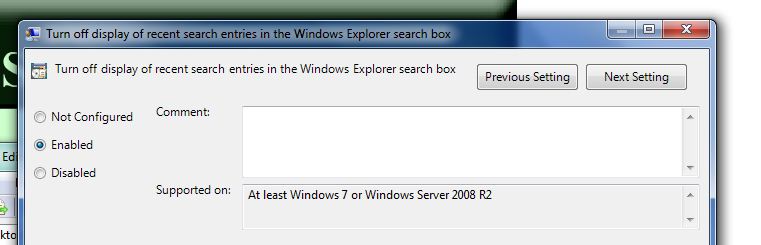
4. Look for “Turn off display of recent search entries in the Windows Explorer search box” entry in the settings panel under Windows Explorer & Double click on it.


5. Click ‘Enabled’, Apply and Ok. Logoff to let the changes take effect.

The Wndows user who doesn't have "gpedit.msc" try tool

MRU search cleaner Click here to download

Enjoy & Have a Nice Day......................

Thursday, June 16, 2011

Move mouse curser by head movement

Do you feel that your fingers are becoming lazy for your mouse and need some rest??? If the answer is yes then the application,

Camera Mouse is a small freeware of 6.13 MB. It can be used to replace the hand controlled mouse with the head movements through your webcam. The snapshot given below shows the use of the utility.

The first step is to select the webcam which you want to use to focus. The pointer will be controlled according to the movements captured by this webcam. The next step is to select the point to be tracked. You have to select a feature of your face which is to be focused.

As nothing is perfect, there are few problems with camera mouse also. It loose the track point very fast. To regain the point you have to select it again and again. At times, it is very difficult to set the pointer repeatedly. But if you have to keep your hands free for a long duration and your face is focused on screen, the utility will surely prove to be useful.

You can Download from given link
Download Camara Mouse

Microsoft official download manager for windows 7

Those who have Internet Download Manager or any other Download Managing utility installed on their system, generally prefer a managed way to download all the downloads or in other words they prefer to manage the downloads by switching any download On or OFF as per the priority of the files being downloaded can go for trying a new utility by Microsoft which can be used for managing all the downloads on your system, its User interface is very simple.

 
Downlod from link given below
Download Microsoft download manager